

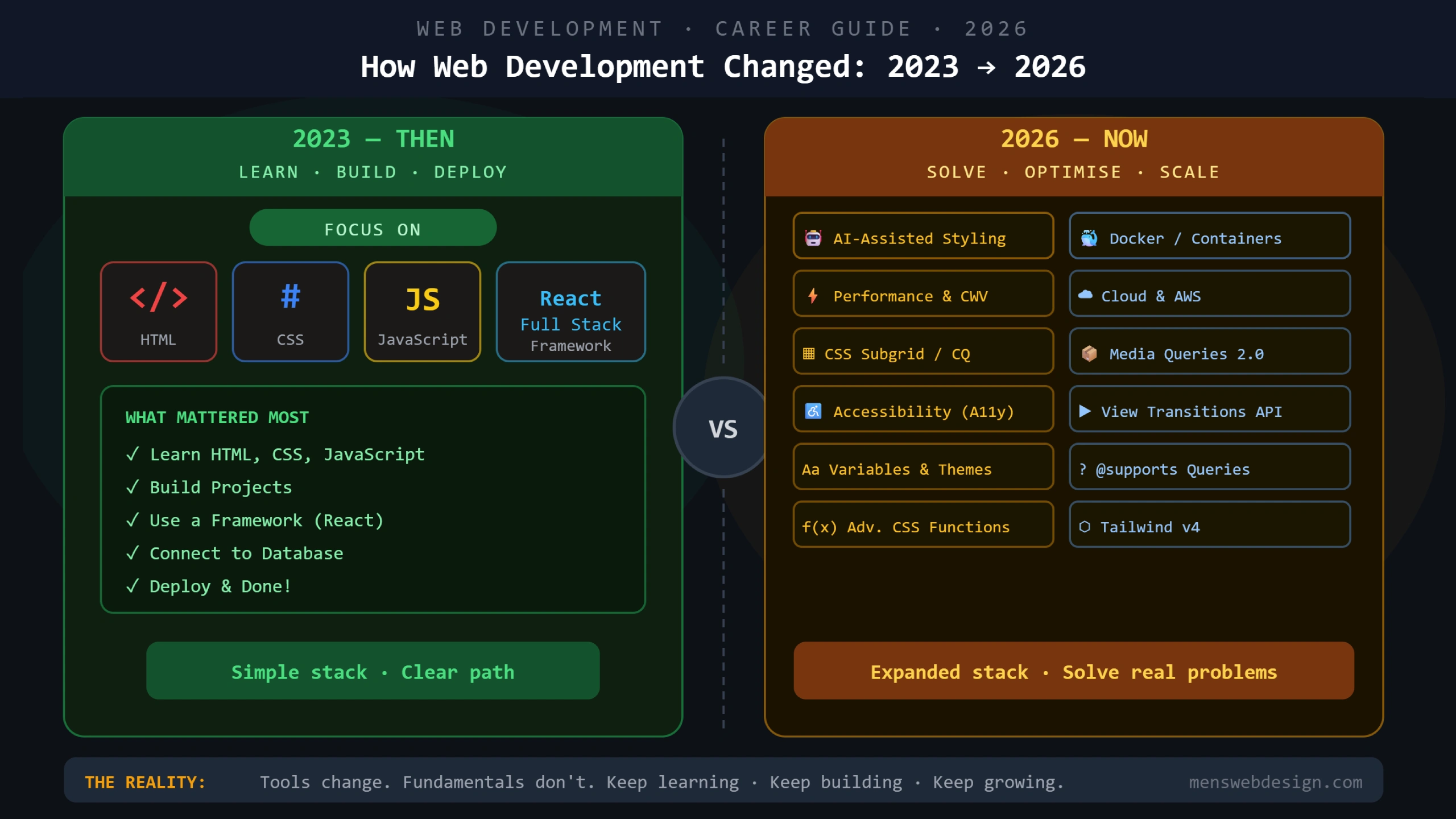
Remember when being a web developer meant learning HTML, CSS, JavaScript, picking up React, connecting a database, and deploying your app? That was 2023. It felt like a lot — and it was.
Fast forward to 2026 and the picture looks considerably more complex. AI tools, containerisation, cloud-native deployment, CSS features that barely existed two years ago, accessibility requirements with legal implications, and a JavaScript ecosystem that never seems to slow down.
If you’re feeling overwhelmed, you’re not alone. The “HELP!” sentiment is real.
But here’s what the panic misses: the fundamentals haven’t changed. The tools have multiplied. The expectations have expanded. But the developers thriving in 2026 are the ones who built solid foundations in 2023 and layered new skills on top — not the ones who chased every new technology without mastering any of them.
This post breaks down exactly what changed, what’s genuinely new and important, and what you can safely deprioritise for now.
The Web Developer in 2023: Learn, Build, Deploy
In 2023, the standard web developer path was relatively clear:
The core stack:
- HTML — structure
- CSS — styling
- JavaScript — interactivity
Next steps:
- Learn a frontend framework (React was the clear frontrunner)
- Understand local databases (SQL or NoSQL)
- Deploy your project (Netlify, Vercel, or a basic VPS)
The mantra was simple: Learn. Build. Deploy.
For most web developers in 2023, this was enough to land a job, freelance successfully, or build a product. The tooling was manageable, the ecosystem was relatively stable, and the learning path was well-documented.
The Web Developer in 2026: Solve, Optimise, Scale
The 2026 developer landscape looks different. The core fundamentals are still there — but the list of expected competencies has grown significantly.
Here’s what’s new, what’s evolved, and what it means for your skill set.
What’s New in 2026 (That Barely Existed in 2023)
1. AI-Assisted Development
This is the biggest shift in how developers actually work day-to-day.
AI coding assistants like GitHub Copilot, Cursor, and Claude have moved from novelty to standard workflow tool for many professional developers. They autocomplete code, explain errors, suggest refactors, write tests, and generate boilerplate at a speed no human can match manually.
What this means for you:
- AI doesn’t replace developers — it amplifies them. A developer who uses AI tools effectively produces significantly more output than one who doesn’t.
- The skill is learning to prompt effectively and critically evaluate AI output — not just accepting whatever it generates.
- Understanding fundamentals is more important than ever. AI tools make junior developers more dangerous, not more capable. Without a solid foundation, you can’t spot when AI gives you subtly wrong code.
Practical starting point: Use GitHub Copilot or Cursor in your daily workflow. Use it for boilerplate and repetitive tasks. Always review and understand what it generates.
2. AI-Assisted Styling & Design
Beyond code, AI has entered the design workflow. Tools like Figma AI, Framer AI, and v0 by Vercel can generate UI components from a text prompt or screenshot.
This doesn’t mean developers don’t need CSS knowledge — quite the opposite. AI-generated UI needs to be reviewed, refined, optimised for performance, made accessible, and integrated into real codebases. That requires a developer who actually understands what the CSS is doing.
What AI styling tools do eliminate is a lot of the manual prototyping grunt work. Developers who can bridge design and code — understanding both visual design principles and technical implementation — are more valuable than ever in 2026.
3. Docker & Containerisation Basics
In 2023, Docker was firmly in the “backend and DevOps” category. Most frontend and full-stack developers could get by without it.
In 2026, that line has blurred significantly.
Why Docker matters for web developers now:
- Modern development teams use Docker to ensure consistent environments across local, staging, and production setups — eliminating the classic “it works on my machine” problem
- Cloud platforms (AWS, Google Cloud, DigitalOcean) increasingly use containerised deployments
- Many client projects now require containerised setups, especially on enterprise or agency work
- Understanding Docker makes you a significantly more complete developer
You don’t need to be a Docker expert. But understanding the basics — what a container is, how to read a Dockerfile, how to run docker-compose up — has moved from a nice-to-have to a professional expectation.
4. Cloud & Deployment Knowledge
Deployment in 2023 often meant dragging files to an FTP server or clicking “Deploy” on Netlify. In 2026, cloud literacy is expected at a deeper level.
What’s now expected:
- Basic AWS or Google Cloud knowledge (S3, EC2, Lambda, or equivalent)
- Understanding of CI/CD pipelines — automated testing and deployment workflows
- Environment variables, secrets management, and basic security practices
- Monitoring and error tracking (Sentry, Datadog basics)
You don’t need an AWS certification to be a great web developer. But understanding what happens when you click “Deploy” — and being able to debug when it goes wrong — is an increasingly valuable skill.
5. CSS Has Evolved Dramatically
CSS in 2026 is not the CSS of 2023. Several powerful features have moved from experimental to widely supported and actively used:
CSS Subgrid Allows grid children to participate in the parent grid’s row and column tracks. Solves alignment problems that previously required JavaScript or complex workarounds.
css
.grid-parent {
  display: grid;
  grid-template-columns: repeat(3, 1fr);
}

.grid-child {
  display: grid;
  grid-column: span 3;
  grid-template-columns: subgrid; /* participates in parent grid */
}
Container Queries Let you style elements based on the size of their container rather than the viewport. This is a fundamental shift for component-based design.
css
@container (min-width: 400px) {
  .card-title {
    font-size: 1.25rem;
  }
}
The :has() Selector Often called the “parent selector” — lets you style a parent element based on what it contains.
css
/* Style a form field wrapper if it contains an invalid input */
.field:has(input:invalid) {
  border-color: red;
}
CSS Cascade Layers Provide explicit control over the order styles are applied — solving specificity wars in large projects.
css
@layer base, components, utilities;

@layer base {
  button { background: gray; }
}

@layer utilities {
  .btn-primary { background: blue; } /* wins regardless of specificity */
}
These aren’t optional extras. They’re features that leading developers and teams are actively using in production today.
6. Accessibility (A11y) — Now a Legal Requirement
Accessibility moved from “nice to have” to a professional and legal requirement in many markets between 2023 and 2026.
The Web Content Accessibility Guidelines (WCAG) 2.2 became the standard, and accessibility lawsuits against websites have increased significantly. In the EU, the European Accessibility Act took effect in 2025, requiring many digital services to meet accessibility standards.
What developers need to know:
- Semantic HTML (using the right elements for the right purpose)
- ARIA attributes (when to use them — and when NOT to)
- Keyboard navigation — every interactive element must be reachable via keyboard
- Colour contrast ratios (minimum 4.5:1 for normal text)
- Screen reader testing basics
Accessibility isn’t just ethical — in 2026, it’s increasingly a legal and commercial requirement.
7. Performance Optimisation is Now a Primary Skill
In 2023, performance was something you thought about after building. In 2026, it’s baked into the development process from day one.
Google’s Core Web Vitals — LCP, INP, and CLS — are confirmed ranking factors. Clients and project managers increasingly track performance scores alongside business metrics.
Every web developer in 2026 should be able to:
- Read and act on a Google PageSpeed Insights report
- Understand what causes poor LCP, INP, and CLS scores
- Implement image optimisation (WebP, lazy loading, correct sizing)
- Audit and reduce JavaScript bundle sizes
- Understand the performance implications of third-party scripts
For a deep dive on Core Web Vitals specifically, read my post: Core Web Vitals in 2025: Complete Developer Fix Guide.
8. Tailwind CSS v4 & Modern CSS Frameworks
Tailwind CSS was popular in 2023. In 2026, Tailwind v4 has become a dominant choice for modern web projects — with a rebuilt engine that’s significantly faster and a new CSS-first configuration system.
Beyond Tailwind, the CSS framework landscape in 2026 includes:
- CSS Modules for component-scoped styles in React/Next.js projects
- Open Props for CSS custom property–based design systems
- PandaCSS for type-safe, zero-runtime CSS-in-JS
The choice between these isn’t about which is “best” — it’s about which fits your project’s needs, team size, and stack.
What Hasn’t Changed (And Never Will)
Amid all of this change, certain fundamentals remain constant — and arguably more valuable than ever:
HTML semantics — Search engines and screen readers still rely on correct, meaningful HTML structure. AI tools generate sloppy HTML. Knowing the right element for the job is a permanent skill.
CSS fundamentals — The box model, specificity, the cascade, flexbox, and grid are the building blocks that all of the new CSS features sit on top of. You can’t use subgrid if you don’t understand grid.
JavaScript core concepts — Closures, promises, async/await, the event loop, DOM manipulation — these don’t expire. Frameworks come and go; JavaScript fundamentals travel with you everywhere.
Problem solving — No AI tool replaces the ability to break down a complex problem, identify the root cause, and implement a solution. This is the core of what makes a developer valuable.
Communication — Explaining technical decisions to non-technical clients and stakeholders is a skill that has only grown in value as projects have grown in complexity.
The 2026 Web Developer Skill Map
Must Have (Non-Negotiable)
- HTML5 semantics and accessibility
- CSS — including subgrid, container queries, cascade layers
- JavaScript — core concepts plus modern ES2024+ features
- Git and version control
- Performance optimisation basics (Core Web Vitals)
- Responsive and mobile-first design
Strongly Recommended
- React or Vue (at least one frontend framework)
- TypeScript (increasingly expected on professional projects)
- Node.js basics
- REST API integration
- AI coding tools (GitHub Copilot, Cursor)
- Docker basics
Valuable Additions
- Cloud deployment (AWS, Vercel, Netlify advanced)
- CI/CD pipelines
- Accessibility testing tools (axe, NVDA, VoiceOver)
- CSS frameworks (Tailwind v4, CSS Modules)
- Basic SEO and Core Web Vitals knowledge
Specialised (Pick Your Path)
- Full-stack: databases, backend frameworks, server-side rendering
- Frontend specialist: advanced animations, WebGL, design systems
- Technical SEO developer: schema markup, crawl optimisation, CWV
- DevOps-adjacent: Docker, Kubernetes basics, cloud infrastructure
The Honest Reality
The infographic that inspired this post captures something real: the 2026 developer looking stressed at their laptop surrounded by a cloud of technologies. It’s a fair representation of how overwhelming the landscape can feel.
But here’s what the stressed developer often misses: you don’t need to know everything. You need to know the fundamentals deeply, be competent in your chosen stack, and be willing to learn new tools as your projects require them.
The developers who are thriving in 2026 aren’t the ones who learned Docker, AWS, Tailwind v4, AI tools, container queries, and accessibility all at once. They’re the ones who built a strong foundation, stayed curious, and added skills deliberately over time.
Tools change. Fundamentals don’t. Keep learning. Keep building. Keep growing.
Where to Start If You’re Feeling Behind
If reading this post made you feel overwhelmed, here’s a practical action plan:
Week 1–2: Audit your HTML and CSS knowledge. Can you build a complex layout with CSS grid and subgrid without looking it up? If not, start there.
Week 3–4: Add an AI coding tool to your workflow. Use GitHub Copilot or Cursor for a real project. Get comfortable prompting and reviewing its output.
Month 2: Run your portfolio or a client site through Google PageSpeed Insights and fix every issue it flags. Core Web Vitals knowledge pays immediate dividends.
Month 3: Spend one weekend with Docker. Build a simple containerised Node.js app. You don’t need to become an expert — you need to stop being afraid of it.
Ongoing: Check browser support for new CSS features on MDN. Experiment with container queries and subgrid in a side project. Accessibility-audit one of your existing projects using the axe browser extension.
Frequently Asked Questions
What skills do web developers need in 2026? Core fundamentals (HTML, CSS, JavaScript) remain essential. New priorities include AI coding tools, Docker basics, cloud deployment knowledge, modern CSS (subgrid, container queries), accessibility standards, and Core Web Vitals optimisation.
Should web developers learn Docker in 2026? Yes — at a basic level. You don’t need to become a DevOps engineer, but understanding containers, reading a Dockerfile, and running docker-compose has become a professional expectation on many development teams.
How is AI changing web development in 2026? AI coding assistants (Copilot, Cursor) accelerate development significantly. AI design tools speed up prototyping. But AI amplifies skilled developers — it doesn’t replace fundamental knowledge. Developers who understand what they’re building use AI tools most effectively.
Do web developers still need to learn HTML and CSS in 2026? Absolutely. Modern CSS has more powerful features than ever — subgrid, container queries, cascade layers, the :has() selector. HTML semantics directly impact SEO and accessibility. Fundamentals are the one thing that doesn’t expire in web development.
Final Thoughts
The gap between a 2023 web developer and a 2026 web developer isn’t about intelligence or talent — it’s about deliberate learning and adaptation.
The developers making the most of 2026 are the ones who treat their skill set as a living, evolving thing: regularly updated, strategically expanded, and always anchored in strong fundamentals.
If you’re building websites for clients or running your own digital business, working with a developer who’s genuinely up to date with the 2026 stack — performance, accessibility, modern CSS, AI-assisted workflows — makes a measurable difference to the quality and longevity of what gets built.